
Abstract
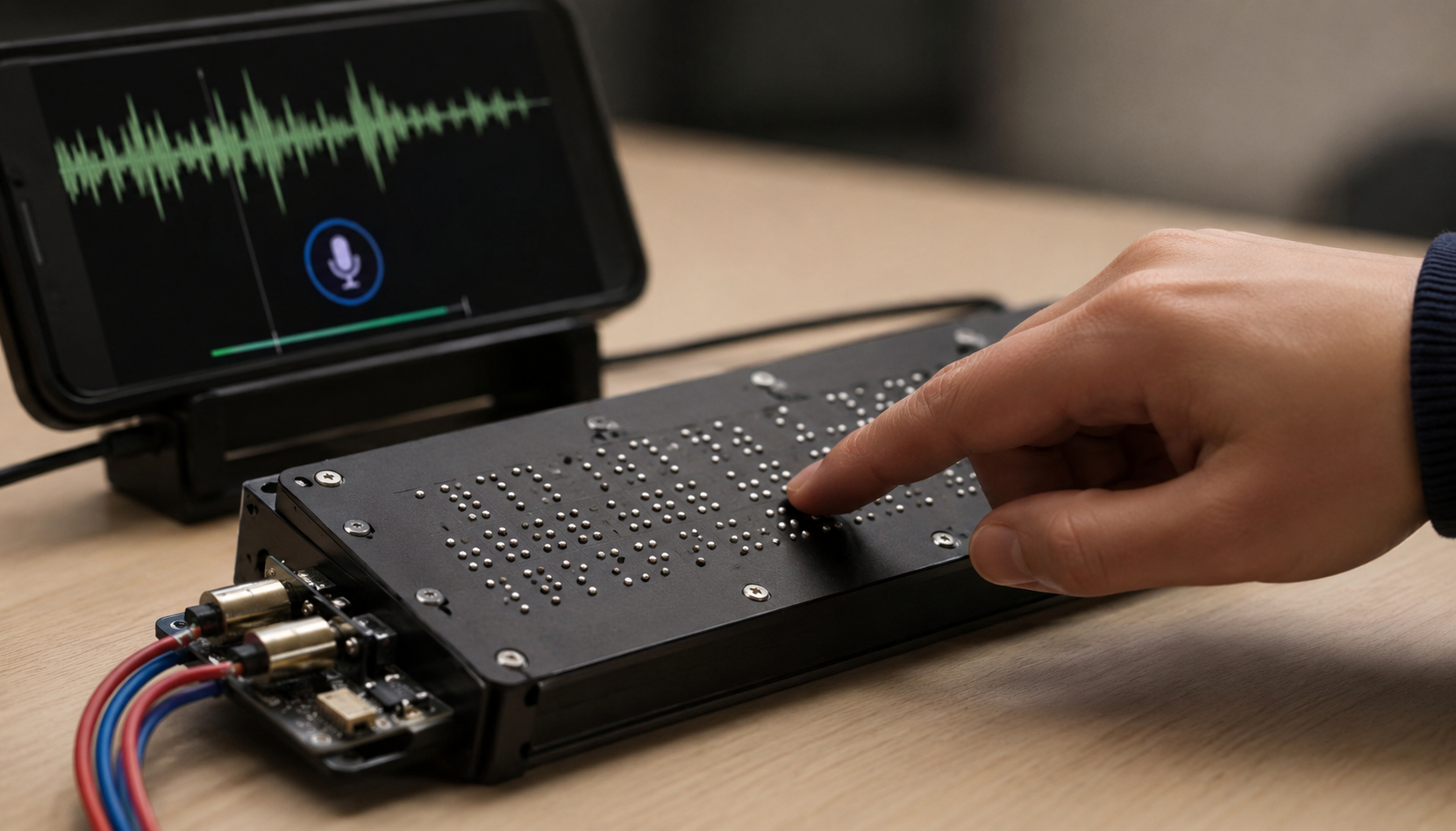
Written language is fundamental to literacy and autonomy, yet many visually impaired students still lack access to affordable refreshable Braille technology. Refreshable Braille displays often cost thousands of dollars because of their piezoelectric actuators, placing them out of reach for many school districts, families, and learners. The purpose of this paper is to demonstrate a concept for a low-cost solenoid based actuator for Braille to assist in the development of tactile literacy. A wired prototype consisted of an Arduino Uno microcontroller, six N-channel MOSFET driver circuits, and six push-pull micro-solenoids. The prototype showed one character at a time in the standard 2 × 3 dot layout, with each actuator driven from software. A companion app, BrailleLearn, pairs with the prototype over Bluetooth. The app sends a character code; the microcontroller converts that code into an on/off pattern for the six solenoids. We ran 100 trials across ten characters. In 96 of them all six pins rose fully, and average rise time was about 20 ms. A staff member at the Washington State School for the Blind reviewed the device and responded favorably. Parts for the prototype came to about $40. That is less than half the cost of the sub-$100 display reported earlier, and a small fraction of what commercial piezoelectric units sell for. The present system has limitations, is not portable and does not have embedded speech recognition. However, the present system demonstrates microsolenoid Braille actuation can be used as an inexpensive replacement for Braille displays using piezo-electric materials. Future versions will also use embedded machine learning based on speech recognition, a latch that uses magnets to reduce the amount of electricity required by the system, and a sealed enclosure for the device.
Keywords: Braille literacy, refreshable Braille display, assistive technology, solenoid actuation, low-cost device, tactile literacy, visually impaired education
Introduction
Braille literacy is a crucial skill for blind students, enabling them to access written language independently in school and to pursue employment later in life. Despite the significance of assessing Braille literacy reliability has been a persistent challenge, and historical attempts by educational institutions to measure and track it have been inconsistent. Braille literacy rates in blind U.S. schoolchildren are estimated to be around 10 percent1. However, some researchers report much lower rates2. A 2022 systematic review identified that there is little reliable evidence supporting estimates such as those previously mentioned3. Therefore, we do not know what percentage of blind students can read Braille. We also don’t know how high or low literacy may be in countries outside of the U.S.
Low Braille literacy is nonetheless strongly associated with poorer long-term outcomes for blind individuals, including lower employment rates, reduced income, and decreased independence in daily life. Ryles found that congenitally blind adults who learned to read Braille had higher employment rates and higher levels of education than those whose primary reading medium was print4, and subsequent work has linked Braille reading history to improved well-being among blind adults5. A national employment survey similarly found that blind and visually impaired adults who read Braille regularly were more likely to be employed and to earn higher wages than those who did not, independent of educational attainment6. Refreshable displays are still the main way to read changing digital text in Braille, and their price is driven mostly by one part. Under every pin sits a stack of thin ceramic strips that flex when voltage is applied, and that flexing is what raises and lowers the dot. The strips are expensive. A 40-cell display usually runs $4,000 to $6,0007 as a result. Few school systems, families, or individual learners can pay that for a tool they need in class every day. This problem is especially severe in low-income settings, where the large majority of visually impaired individuals live8.
Auditory-only text-to-speech devices offer visually-impaired individuals auditory access to written language but do not reproduce the cognitive advantages associated with tactile reading processes. Reading tactilely involves higher order cognitive processes and utilizes more spatial knowledge than listening alone9; additionally, neuroimaging studies show that blind individuals utilizing Braille activate both primary and secondary visual cortices (as well as other brain regions), indicating multi-modal cortical involvement associated with reading tactually10. Braille also makes punctuation, spelling, and paragraphing directly perceptible in a way that audio alone cannot convey. Voice To Touch utilizes tactile learning pathways that rely upon repeated tactile contact of each letter/character of the Braille message, which are missing from text-to-speech-only tools used by visually impaired people. This repetitive tactile interaction supports multi-modal learning behaviors studied extensively within the neuroscience community.
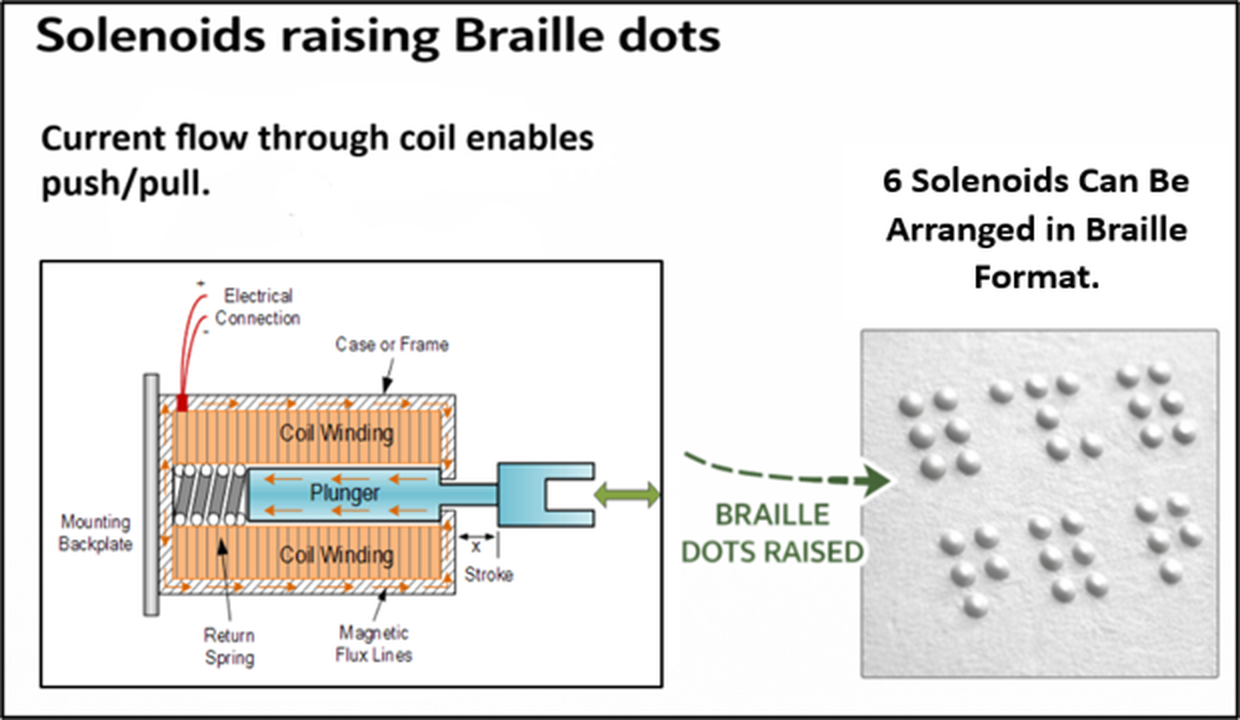
Work on cheaper, simpler refreshable displays has covered most of the electromechanical options. Two surveys of actuation methods both landed on electromagnetic actuation as the strongest candidate on cost and on engineering grounds11,12. Solenoids are cheap, they move a pin without any linkage to speak of, and they are easy to switch on and off. Current through the coil sets up a magnetic field that pulls the plunger up the bore. The motion is linear, push and pull. Six of them fit in a 2 × 3 grid, the same layout as one Braille cell, one solenoid per dot. Energize a solenoid and its dot goes up. Cut power and the dot sits flush. Which dots are up and which are down is what makes the character (Figure 1). Each solenoid has its own driver, so any letter, number, or symbol in the code can be produced by choosing the right six states.
The tradeoff is real. These systems draw little power and have few moving parts, but they do have limits. Run continuously, or run warm, and a solenoid can overheat or stick13. Off-the-shelf units are also physically large, which is a problem as soon as a display needs to be light or pack cells closely together. Bench characterizations of small linear solenoids show hysteresis that varies with stroke, plus a measurable delay between switching on and the plunger reaching the end of its travel14,15. That delay is why we chose microsolenoids and why we timed the pin rise ourselves rather than assuming it (Sections “Braille Cell Mechanism” and “Solenoid Actuation and Actuation Reliability”).
Varada took a different route: a solenoid-driven cell that latches with a cam16. Each pin moves straight up and down, but it is tied to a rotating cam with a magnet set into it. The solenoid never touches the dot. It turns the cam. On each pulse the plunger rotates the cam about 60 degrees, and that rotation is what lifts or drops the pin. Cut the power and the magnet holds the cam where it stopped, so the dot stays up on its own. This latching behavior reduces power consumption while keeping strong tactile feedback, as shown in Figure 2.
A prior low-cost Braille display developed by Marathe and Shinde demonstrated a sub-$100 design using six solenoids controlled by a PIC32 microcontroller. The display was created for $99.00, included six solenoid actuators (as opposed to a typical forty-eight) driven by a PIC32 microprocessor. The input process was carried out via Bluetooth, through a user’s smartphone. Although the project demonstrated the viability of producing tactile Braille through inexpensive components, it was limited to use solely with pre-generated (pre-typed) text via a mobile app; therefore, users would be reliant upon touchscreens or voice assistants to access material when neither may be suitable or available to visually impaired people. In addition to the Voice To Touch and two prototype devices described above, several other low-cost and single-actuator approaches have recently been developed and tested with blind subjects. These include sliding-actuator and electromagnetic cell-based devices17,18. In addition to demonstrating the need for cost-effective tactile Braille displays and the technical barriers still remaining in developing them. In addition to comparing Voice To Touch with other prototypes, an additional direct comparison was conducted against another relatively similar prior device. These comparisons were made in Table1.
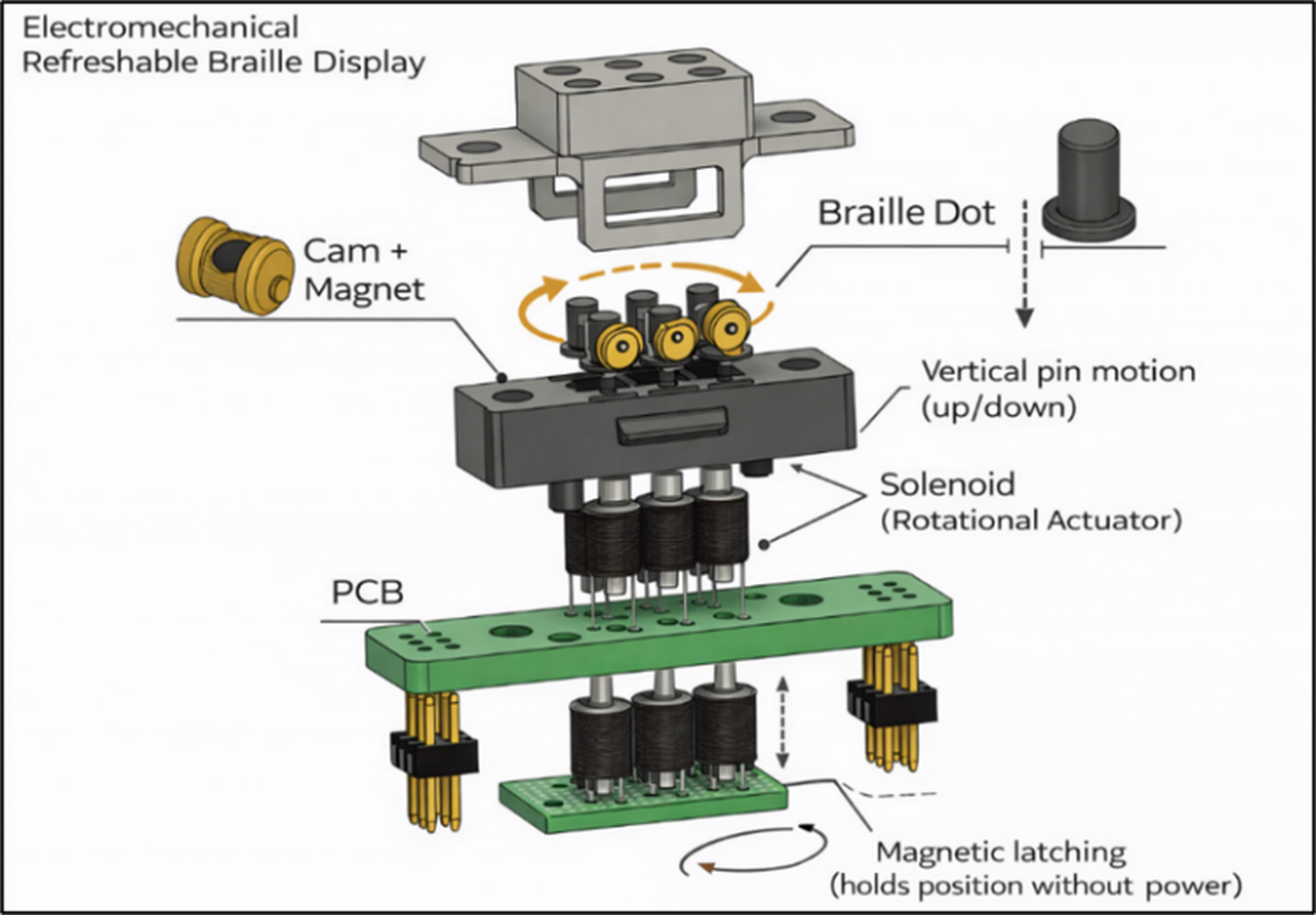
Figure 2 | Exploded view of the cam-latching refreshable Braille cell mechanism.
| Feature | Marathe & Shinde (2017) | Voice to Touch (this work) |
| Actuator type | Standard solenoids (×6) | Microsolenoids (×6) |
| Microcontroller | PIC32 | Arduino Uno (prototype) |
| Input method | Pre-typed text via smartphone | Character codes via BrailleLearn app |
| Estimated component cost | Sub-$100 | ~$40 |
| Companion learning tool | None | BrailleLearn lesson app |
| Portability | Benchtop | Benchtop (portable enclosure planned) |
This paper describes a proof-of-concept solenoid-based Braille cell that costs about 50% less than the nearest comparable design we could find, and pairs it with a companion learning app — something we haven’t seen done together before.
Methods
Voice to Touch builds on the electromechanical approach above while fixing its weak points. In this proof-of-concept, character codes come from a companion app to the microcontroller, which briefly energizes the right solenoids to raise the correct pins. We picked microsolenoids for one reason: heat. They pull less current than standard units and shed what heat they do produce faster. The microcontroller determines when the driver pin will be active based on the time needed by the sensor for reading purposes. In addition, section “Discussion” addresses the overall system architecture, which will utilize an embedded speech engine and microphone to replace the companion application as the sensing mechanism.
Cost Analysis and Bill of Materials
Affordability drove this project, so every part is cheap and easy to source. Table 2 breaks down what went in and what it cost — the whole build came to roughly $40 in components. The nearest prior low-cost design, from Marathe and Shinde, came in under $10019; commercial 40-cell piezoelectric displays run into the thousands7. Our prototype is one cell, not forty, so the comparison isn’t apples-to-apples — but even accounting for that, the component cost sits an order of magnitude under commercial hardware, which is exactly what we set out to test. These are single-unit hobbyist prices. Buying at volume would push them lower.
| Component | Model / Specification | Estimated Cost |
| Microcontroller | Arduino R4 (Uno-class) | $10 |
| Microsolenoids (×6) | 8 mm cylindrical DC microsolenoids | $6 |
| N-channel MOSFETs (×6) | 2N7000 | $0.60 |
| MEMS microphone module | ICS-43434 | $5 |
| Flyback diodes (×6) | 1N4148 | $0.60 |
| Breadboard and jumper wires | Standard prototyping | $5 |
| 3D-printed enclosure | PLA filament | $2 |
| 5 V USB power bank | 2500 mAh | $10 |
| Total | ~$40 |
Physical Pad Design and Enclosure Architecture
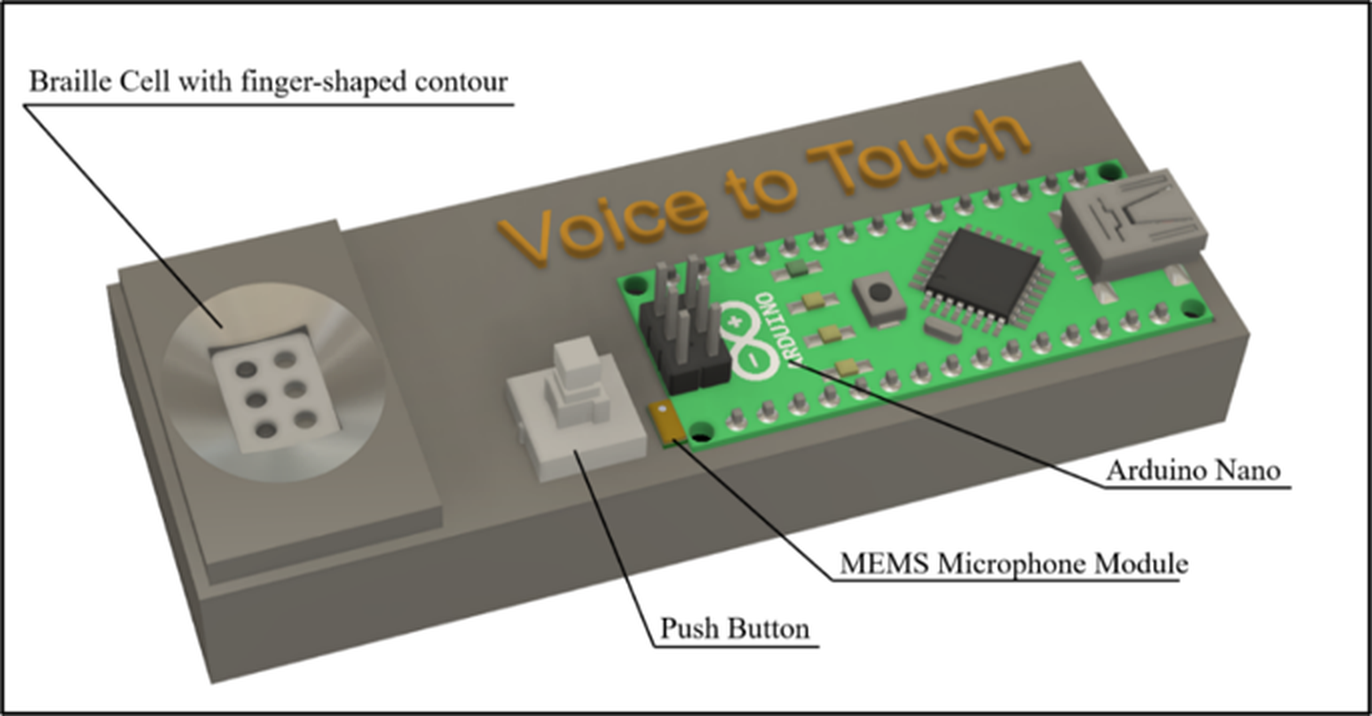
The device is a single-cell Braille pad, 1.1 × 8.5 × 3.2 cm. The lower body holds the electronics — Arduino, driver board, battery pack. The upper part of the touch-plate has the 2×3-cell: A very thin, shallow finger-shaped container for the fingertips. Six small holes in the container allow the pins to pass through; Only the rounded ends of the pins break the surface. Both the container (body) and the plate are made using 3D printing. Figure 3 shows the CAD rendering.
Braille Cell Mechanism and Solenoid Actuation
Six miniature push-pull solenoids sit under the tactile plate, one per dot, each driving a steel pin up through an alignment rail and through the plate. They press-fit into a 3D-printed rail set to standard Braille dot spacing. The wiring stays plain on purpose: each coil is a two-terminal load, high-side leads tied to the breadboard’s 5 V bus, low-side leads each going to their own MOSFET with the source on ground. A Fast-Recovery Fly-Back Diode is placed across each Coil. Anode of this diode should be connected to MOSFET drain-side and Cathode will connect to 5V Side. This allows a place for Inductive Energy to go once MOSFET turns OFF. The gate timing determines which dots are raised and for what duration. No Analog Components reside within the system.
The main reason we selected Micro-Solenoid over Standard Solenoids was due to Lower Current Consumption, Less Space Required & Less Heat Generated.
| Spec | Standard | Microsolenoid (this work) |
| Diameter | ~15 mm | ~8 mm |
| Operating current | ~500 mA | ~150 mA |
| Operating voltage | 12 V | 5 V |
| Max continuous ON time | ~30 s | Limited by firmware hold time |
| Typical price/unit | ~$4 | ~$1 |
MOSFET Driver Circuit
Each solenoid has an N-channel MOSFET with a low side configuration (2N7000). The gate drive signal comes directly from an Arduino digital I/O pin. There is a series resistor at the gate to limit transients during turn-on. Additionally there is a pull-down resistor between the gate and source that will hold the FET off while the pin is high impedance. When the gate is high, the FET conducts and current flows from the +5V rail thru the coil to ground causing the actuator to fire. When the gate goes low, the FET shuts off, but the fly-back diode across the coil limits the voltage spike produced by the collapsing magnetic field. Tab. 4 contains a nominal set of values for one channel that are sufficient to recreate a single channel schematic diagram in any software package. Each of the channels on my test setup drew approximately 150mA during activation.
| Parameter | Value (nominal) |
| MOSFET | 2N7000 (N-channel, logic-level) |
| Gate drive voltage | 5 V (Arduino digital output) |
| Series gate resistor | 100 Ω |
| Gate pull-down resistor | 10 kΩ |
| Supply rail | 5 V |
| Flyback diode | 1N4148 |
| Per-solenoid current draw (actuation) | ~150 mA |
Microcontroller and Control Logic
The Arduino does all of the processing. It provides power via its 5 V and GND pads to each module connected to it including the microphone pad, the button pad, the driver pad, and the solenoid pads. There are also 6 digital I/O pads reserved for each of the 6 dots that are set up with a high or low logic level. The MEMS microphone will be connected to one of the A/D converters. The button is connected to a DIO (Digital Input/Output) pin (for example D8), but since it has no current capability, we use the internal pull-up resistor so it will always read as “high” unless you press it down and then it will read “low”.
In our standalone design we are planning on taking a sample of audio whenever the button is pressed. In our prototype we are receiving character data from the accompanying smart phone application instead.
Planned Audio Capture and Speech Recognition
On-device speech recognition is part of the full Voice to Touch concept, but it’s not in this prototype — nothing in this section is a tested result. The MEMS microphone provides an analog signal in relation to the sound pressure and this is sampled by the Arduino and stored in memory until there is enough data to transfer it to a smaller trained model which then performs feature extraction based on the sample data.
We’re targeting small-vocabulary keyword spotting, since that task fits microcontroller hardware well. Compact keyword-spotting models have run in real time on microcontrollers with under a megabyte of memory20,21, and TensorFlow Lite for Microcontrollers and Edge Impulse are the usual tools for training and deploying them22,23. One recent system hit roughly 97% recognition accuracy on a 23-keyword vocabulary using an Arduino-class board24. Others have pushed inference below a milliwatt by pairing analog feature extraction with binary neural networks25 — which suggests the power budget of our planned battery-powered enclosure could absorb a recognition stage. We haven’t implemented or measured any of this. Vocabulary size, word error rate, inference latency, and power draw during inference get reported once the recognition stage actually exists. The current device does not do speech-to-Braille conversion.
Text-to-Braille Mapping and Solenoid Control
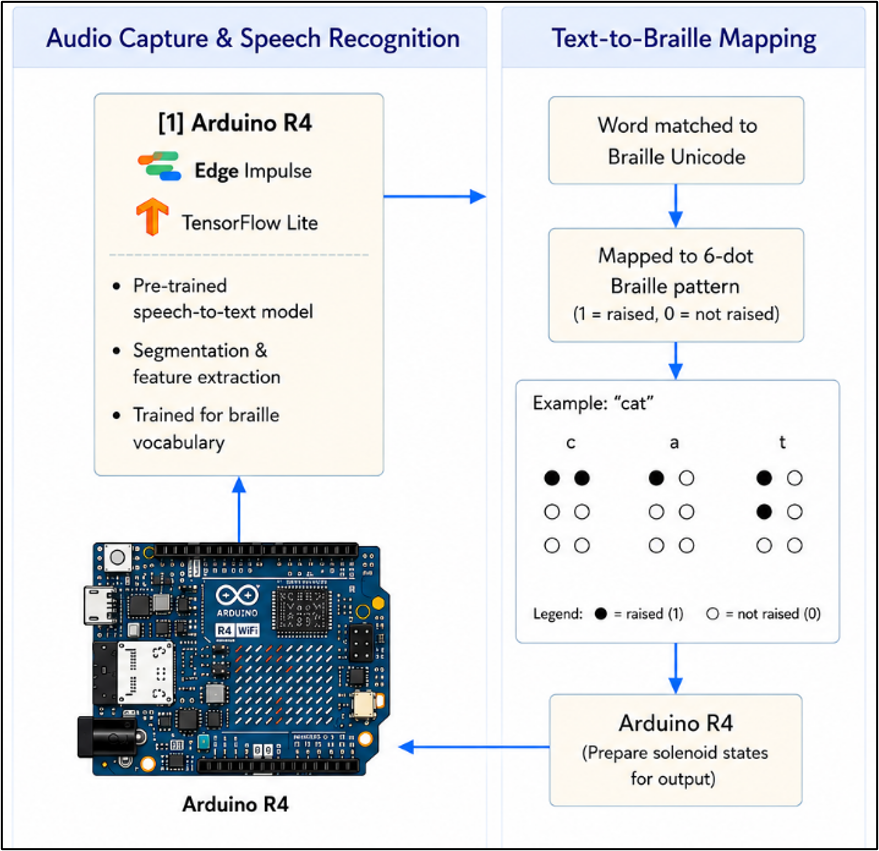
A character arrives — from the companion app in the current prototype, or from the recognition model in the planned system — and goes through a Unicode Braille reference table, coming out as a 6-bit pattern showing which dots should rise. Take the letter “c”: it maps to ⠉, dots 1 and 4. The pattern drives those two gate lines high, leaves the other four low, holds for a set reading interval, then releases before the next character. Figure 4 traces the whole path, input character to Braille lookup to raised dots.
Power Supply and Latching Behavior
The prototype uses one 5 V USB power bank connected to the Arduino via the USB interface. The power rail and ground of the Arduino header pins connect to the breadboard rails using jumper wires, which allows all subsystems to use the same 5 V rail.
One important point to be made: this prototype does not feature latching capabilities. Each solenoid stays energized throughout the entire time it is displaying its corresponding character and becomes de-energized as soon as the next character comes along. The magnetic latch mechanism using the cam design, as described by Varada16, which keeps the dots in place without using any power, is planned for the next iteration of the prototype and is not part of this prototype system being evaluated. Since the system is using continuously energized pulses instead, it consumes more energy in display mode than a latching mechanism would.
Results
BrailleLearn, the companion learning tool, walks visually impaired users through Braille lessons step by step. This application is a teaching application, and not a physical one; all it does is transmit character codes. In order to convert these lessons into something tangible, we created a hardwired test circuit which connects via Bluetooth with the application and displays characters using the solenoids. The setup diagram of our hardwired test circuit is shown in Figure 5, including an Arduino Uno, six N-Channel MOSFET switches, six flyback diodes, and six solenoids aligned below a tactile Braille display.
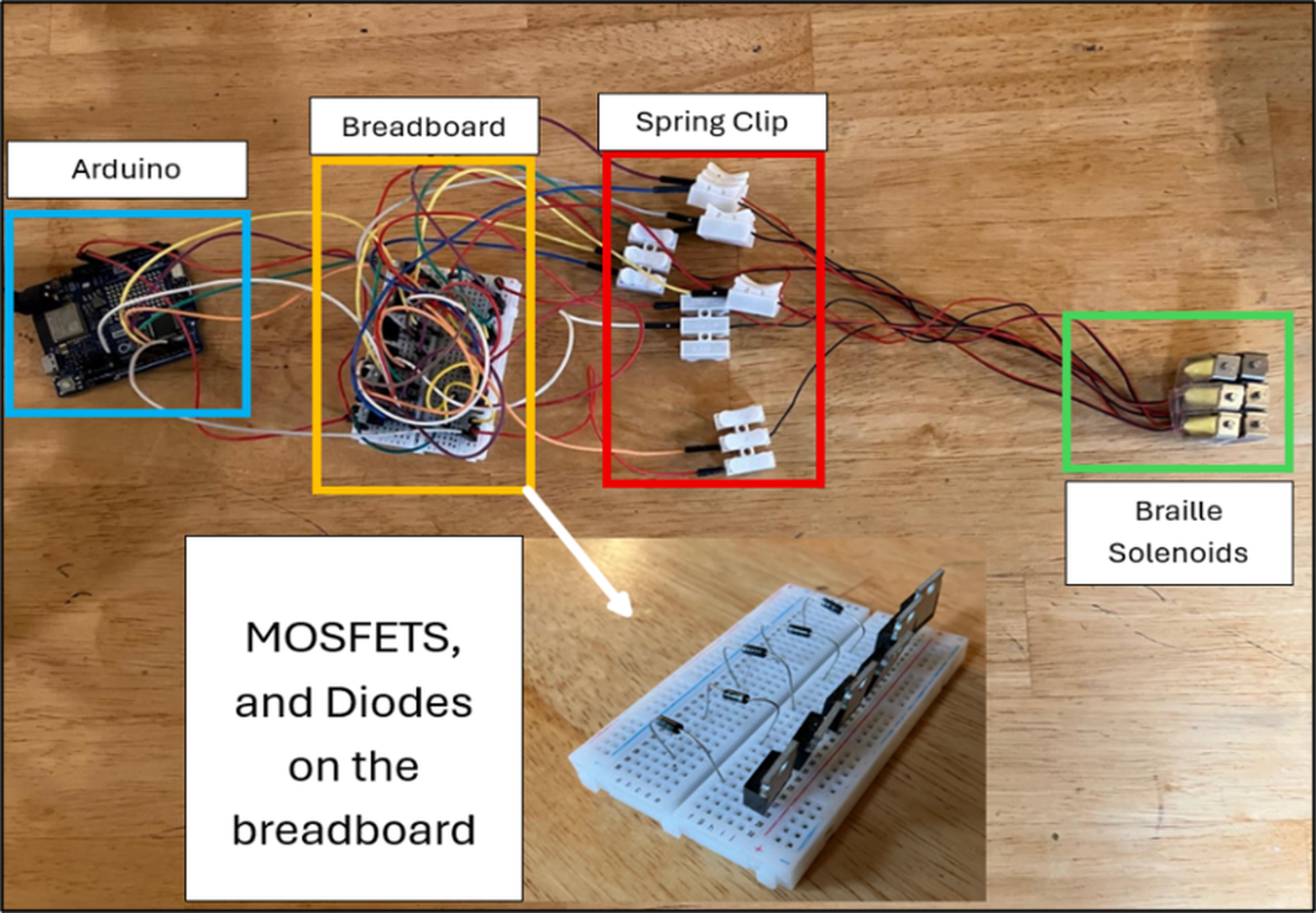
This is the circuit where the more general idea of Voice to Touch is initiated, but the scope of its application is deliberately limited — it is not portable, nor does it do speech recognition or voice translation. Still, what it gives us is a functional solenoid-based actuator for creating Braille characters. Besides the previous data, new data was obtained via repeated bench testing using this circuit, and the information concerns three issues: actuation reliability, electrical and thermal behavior of the circuit, and geometric similarity of dots created by the actuator to Braille Standards.
Actuation Reliability
In order to investigate the reliability, each character was commanded repeatedly, and whether the full pattern rise had been achieved was recorded. Each character was tested ten times; success rate, mean pin rise time, and number of partially or unsuccessfully actuated characters were recorded. Rise time was determined as the time between command issuance and confirmation of pin rising. Table 5 presents detailed statistics. Of 100 actuations using ten different characters, 96 actuated fully and had an average rise time of around 20 milliseconds. All four unsuccessful actuations were partial — there was only one dot which did not achieve full rising travel. These actuations were attributed to certain instability in contacts operated on breadboards instead of solenoids, and no character failed to actuate fully. Literature reports millisecond response times of small push and pull solenoids, so our results are consistent with that.
| Character | Trials | Success rate | Avg. actuation time | Failures observed |
| A (⠁) | 10 | 10/10 (100%) | 19 ms | 0 |
| B (⠃) | 10 | 10/10 (100%) | 20 ms | 0 |
| C (⠉) | 10 | 10/10 (100%) | 20 ms | 0 |
| D (⠙) | 10 | 9/10 (90%) | 21 ms | 1 partial (dot 4) |
| E (⠑) | 10 | 10/10 (100%) | 19 ms | 0 |
| L (⠇) | 10 | 10/10 (100%) | 21 ms | 0 |
| O (⠕) | 10 | 9/10 (90%) | 22 ms | 1 partial (dot 5) |
| R (⠗) | 10 | 10/10 (100%) | 21 ms | 0 |
| T (⠞) | 10 | 10/10 (100%) | 20 ms | 0 |
| Z (⠵) | 10 | 9/10 (90%) | 22 ms | 1 partial (dot 6) |
| Overall | 100 | 96/100 (96%) | 20.5 ms (mean) | 4 partial, 0 full |
Electrical and Thermal Characterization
Since the ultimate aim is a portable device, it is important to consider power. Our characterization of the circuit involved measurements with a multimeter and observation of the temperature of the solenoid using the contact thermometer. Table 6 presents these results. The current consumed by each microsolenoid when actuating was approximately 150 mA. The idle state of the device consumed approximately 50 mA. The display involving one cell and approximately three dots would consume approximately 500 mA, while the worst-case scenario of displaying all the six dots would consume approximately 950 mA. The design incorporates pulsed signals that are non-latching (section “Power Supply and Latching Behavior”), meaning that current flow occurs only when there is a character displayed. Typical usage of 9 hours can be considered, assuming that the 2500 mAh battery is used in this application.
The temperature of the solenoid surface increases by approximately 10 °C during ten seconds of continuous actuation. This temperature increase is negligibly small and far below safe limits. The main reason for using microsolenoids is based on the consideration of heat.
| Quantity | Measured value |
| Per-solenoid current draw (actuation) | ~150 mA |
| Total device current (idle) | ~50 mA |
| Total device current (single-cell display, ~3 dots) | ~500 mA |
| Total device current (worst case, 6 dots raised) | ~950 mA |
| Solenoid temperature after 10 s actuation | ~32 °C (ambient ~22 °C) |
| Estimated battery life (2500 mAh, typical use) | ~9 h |
Tactile Quality Relative to Braille Standards
Standard Braille calls for a dot height of 0.48 mm above the surface, a dot diameter of 1.44 mm, horizontal and vertical dot spacing of 2.34 mm, and cell spacing of 6.2 mm. We measured the prototype’s pin heights in both states, pin diameter, and dot spacing against those figures; Table 7 has the comparison. Everything landed within about 5% of the Marburg Medium standard: raised-dot height near 0.46 mm, pin-tip diameter near 1.5 mm, spacing near 2.4 mm. Depressing a raised pin took roughly 0.18 N, in line with the light touch standard tactile Braille expects. Cell spacing does not apply to a single-cell device. Taken together the geometry sits close to what legible Braille requires, which matches the tactile feedback we got during expert evaluation. Getting this geometry right is not a minor detail: experienced Braille readers discriminate two points more finely than sighted controls26, and active tactile acuity tracks directly with reading speed27. A pin that deviates from standard will cost a less experienced reader more than it costs a fluent one.
| Dimension | Standard | Prototype (measured) |
| Dot height (raised) | 0.48 mm | ~0.46 mm |
| Dot diameter | 1.44 mm | ~1.5 mm |
| Horizontal dot spacing | 2.34 mm | ~2.4 mm |
| Vertical dot spacing | 2.34 mm | ~2.4 mm |
| Cell spacing | 6.2 mm | N/A (single cell) |
| Force to depress raised pin | — | ~0.18 N |
Preliminary Expert Evaluation
The prototype was taken to the Washington State School for the Blind, where Lee Chandler, a staff member there, reviewed the basic circuit design, giving his opinion regarding the tactile quality and clarity of layout. It was just one session. Comments on the raised characters were made by the evaluator, who expressed an opinion on the readability of raised characters, and on spacing. Chandler is sighted and professionally involved in teaching Braille; there were no visually impaired or blind students present during the evaluation. Below you can find a summary of evaluator’s comments; it should not be regarded as a usability rating score.
Limitations are obvious in this case. One evaluator, one session, no blind or visually impaired readers mean that nothing in terms of educational utility of the device was verified. This should be regarded only as qualitative feedback. The next evaluation will involve structured protocol with a rating scale, a comparison test using a standard Braille cell and blind/visually impaired student readers, as described in section “Discussion”.
Discussion
The purpose of this study was to demonstrate the feasibility of an affordable Braille display device based on a solenoid-activated Braille actuator. The cost of developing such a device using standard micro-solenoids and two-dimensional Braille cells (two rows of three cells) is approximately forty dollars in components. The scope is narrow by design. What we have established is reliable single-cell actuation and a cost basis, not a finished standalone speech-to-Braille device.
The prototype is wired, single-cell, and benchtop; it does not travel, and it has no embedded speech recognition, which the full concept requires. A single cell also means very little information at once, so reading happens character by character. That burden can be quantified: time how many distinct patterns the cell can present and clear in a minute, and the resulting characters-per-minute figure sets a ceiling on reading speed for any single-cell device. It is also the strongest argument for going multi-cell. Microsolenoids run cooler than standard solenoids, but sustained high-frequency actuation still needs proper thermal characterization, and pulsing without a magnetic latch keeps display-mode power draw higher than it has to be. Finally, the expert evaluation so far has not included a single blind or visually impaired reader.
Future work has a clear order. First is usability testing with blind and visually impaired students, using a structured Likert-scale protocol and a direct comparison against a standard Braille cell. Second is full integration: audio capture, embedded recognition, and Braille display in one portable unit, reported with real recognition metrics (vocabulary size, word error rate, latency, power). Third is magnetic latching, along with measured battery life. Fourth is expanding past one cell so words and sentences can appear at once. In addition to those, I’d like to adjust the timing of the pulses for both heating reduction as well as reaching a level of reliability in which an enclosure could be used on a regular basis.
The Microsolenoid Braille actuator has been tested, and at no extra cost. This is what was found. The circuit needed to make a workable device that one could reasonably take to school still needs development, however the validity of the actuator has been demonstrated, the costs have been broken down, and the learning application will provide something to show off with respect to the hardware.
References
- National Federation of the Blind Jernigan Institute. The Braille literacy crisis in America: facing the truth, reversing the trend, empowering the blind. National Federation of the Blind, https://nfb.org/images/nfb/documents/pdf/Braille_literacy_report_web.pdf, 2009. [↩]
- From the Community. Despite braille’s 200th anniversary, there is a braille literacy crisis. The Stanford Daily, https://stanforddaily.com/2024/10/06/braille-literacy-crisis-stanford/, 2024. [↩]
- R. M. Sheffield, F. M. D’Andrea, V. Morash, S. Chatfield. How many Braille readers? Policy, politics, and perception. Journal of Visual Impairment & Blindness. Vol. 116, pg. 14–25, 2022, https://doi.org/10.1177/0145482X211071125. [↩]
- R. Ryles. The impact of Braille reading skills on employment, income, education, and reading habits. Journal of Visual Impairment & Blindness. Vol. 90, pg. 219–226, 1996. [↩]
- A. M. Silverman, E. C. Bell. The association between Braille reading history and well-being for blind adults. Journal of Blindness Innovation and Research. Vol. 8, no. 1, 2018, https://doi.org/10.5241/8-141. [↩]
- E. C. Bell, N. M. Mino. Employment outcomes for blind and visually impaired adults. Journal of Blindness Innovation and Research. Vol. 3, no. 2, 2013. [↩]
- M. A. Alam, N. C. Roy, D. K. Paul, N. Fairuz. Refreshable Braille display: a review of existing technologies and a proposed method. 2024 IEEE International Conference on Power, Electrical, Electronics and Industrial Applications (PEEIACON), 2024. [↩] [↩]
- World Health Organization. Increasing eye care interventions to address vision impairment. Technical brief, https://www.who.int/publications/m/item/increasing-eye-care-interventions-to-address-vision-impairment, 2023. [↩]
- S. Dolphin, M. Downing, M. Cirrincione, A. Samuta, K. Leite, K. Noble, B. Walsh. Information accessibility in the form of Braille. IEEE Open Journal of Engineering in Medicine and Biology. Vol. 5, pg. 205–209, 2024, https://doi.org/10.1109/OJEMB.2024.3364065. [↩]
- N. Sadato, A. Pascual-Leone, J. Grafman, V. Ibáñez, M.-P. Deiber, G. Dold, M. Hallett. Activation of the primary visual cortex by Braille reading in blind subjects. Nature. Vol. 380, pg. 526–528, 1996, https://doi.org/10.1038/380526a0. [↩]
- H. Chen, W. Tao, C. Liu, Q. Shen, Y. Wu, L. Ruan, W. Yang. A novel refreshable Braille display based on the layered electromagnetic driving mechanism of Braille dots. IEEE Transactions on Haptics. Vol. 16, pg. 96–105, 2023, https://doi.org/10.1109/TOH.2023.3241952. [↩]
- M. Etezad, R. Joshi, F. L. Cibrian. Advancements in refreshable Braille display technology: a comprehensive survey. Displays. Vol. 90, pg. 103133, 2025, https://doi.org/10.1016/j.displa.2025.103133. [↩]
- D. Kavitha, V. Radha. Survey on various actuator technologies for refreshable Braille e-book reader. International Conference on Mobile Computing and Sustainable Informatics, pg. 273–280, 2020, https://doi.org/10.1007/978-3-030-49795-8_27. [↩]
- M. Ruderman, A. Gadyuchko. Phenomenological modeling and measurement of proportional solenoid with stroke-dependent magnetic hysteresis characteristics. 2013 IEEE International Conference on Mechatronics (ICM), pg. 180–185, 2013, https://doi.org/10.1109/ICMECH.2013.6518532. [↩]
- K. Harmer, G. W. Jewell, D. Howe. Transient performance of a short-stroke linear solenoid actuator. IEE Proceedings – Electric Power Applications. Vol. 149, no. 5, pg. 379–384, 2002, https://doi.org/10.1049/ip-epa:20020472. [↩]
- V. R. Varada. Refreshable Braille display. Hackaday.io project, https://hackaday.io/project/10849-refreshable-braille-display, 2016. [↩] [↩]
- C. Loconsole, D. Leonardis, M. Gabardi, A. Frisoli. BrailleCursor: an innovative refreshable Braille display based on a single sliding actuator and simple passive pins. 2019 IEEE World Haptics Conference (WHC), 2019, https://doi.org/10.1109/WHC.2019.8816128. [↩]
- D. Chen, Y. Zhang, X. Hu, G. Chen, Y. Fang, X. Chen, J. Liu, A. Song. Development and evaluation of refreshable Braille display and active touch-reading system for digital reading of the visually impaired. IEEE Transactions on Neural Systems and Rehabilitation Engineering. Vol. 32, pg. 934–945, 2024, https://doi.org/10.1109/TNSRE.2024.3363495. [↩]
- M. Marathe, A. Shinde. Portable Braille reader. ECE 4760 Final Project Report, Cornell University, https://people.ece.cornell.edu/land/courses/ece4760/FinalProjects/f2017/mmm389_ahs278/mmm389_ahs278_final_report_2/mmm389_ahs278_final_report_2.html, 2017. [↩]
- Y. Zhang, N. Suda, L. Lai, V. Chandra. Hello edge: keyword spotting on microcontrollers. arXiv:1711.07128, https://arxiv.org/abs/1711.07128, 2017. [↩]
- S. Garai, S. Samui. Advances in small-footprint keyword spotting: a comprehensive review of efficient models and algorithms. arXiv:2506.11169, https://doi.org/10.48550/arXiv.2506.11169, 2025. [↩]
- R. David, J. Duke, A. Jain, V. Janapa Reddi, N. Jeffries, J. Li, N. Kreeger, I. Nappier, M. Natraj, T. Wang, P. Warden, R. Rhodes. TensorFlow Lite Micro: embedded machine learning for TinyML systems. Proceedings of Machine Learning and Systems. Vol. 3, pg. 800–811, 2021. [↩]
- P. Warden, D. Situnayake. TinyML: machine learning with TensorFlow Lite on Arduino and ultra-low-power microcontrollers. O’Reilly Media, 2019. [↩]
- A. Barovic, A. Moin. TinyML for speech recognition. arXiv:2504.16213, https://doi.org/10.48550/arXiv.2504.16213, 2025. [↩]
- G. Cerutti, L. Cavigelli, R. Andri, M. Magno, E. Farella, L. Benini. Sub-mW keyword spotting on an MCU: analog binary feature extraction and binary neural networks. arXiv:2201.03386, https://doi.org/10.48550/arXiv.2201.03386, 2022. [↩]
- J.-W. Noh, B.-S. Park, M.-Y. Kim, L.-K. Lee, S.-M. Yang, W.-D. Lee, Y.-S. Shin, J.-H. Kang, J.-H. Kim, J.-U. Lee, T.-Y. Kwak, T.-H. Lee, J.-Y. Kim, J. Kim. Differences in two-point discrimination and sensory threshold in the blind between braille and text reading: a pilot study. Journal of Physical Therapy Science. Vol. 27, no. 6, pg. 1919–1922, 2015, https://doi.org/10.1589/jpts.27.1919. [↩]
- N. Martiniello, M. Barlow, W. Wittich. Exploring correlates of braille reading performance in working-age and older adults with visual impairments. Scientific Studies of Reading. Vol. 26, no. 4, pg. 267–286, 2022, https://doi.org/10.1080/10888438.2021.1969402. [↩]